

Installation Guide for Activating PinkDocs
This guide provides developers with detailed instructions on how to activate PinkDocs. Follow these steps to ensure a successful installation and activation of the plugin.
Step-by-Step Installation Instructions
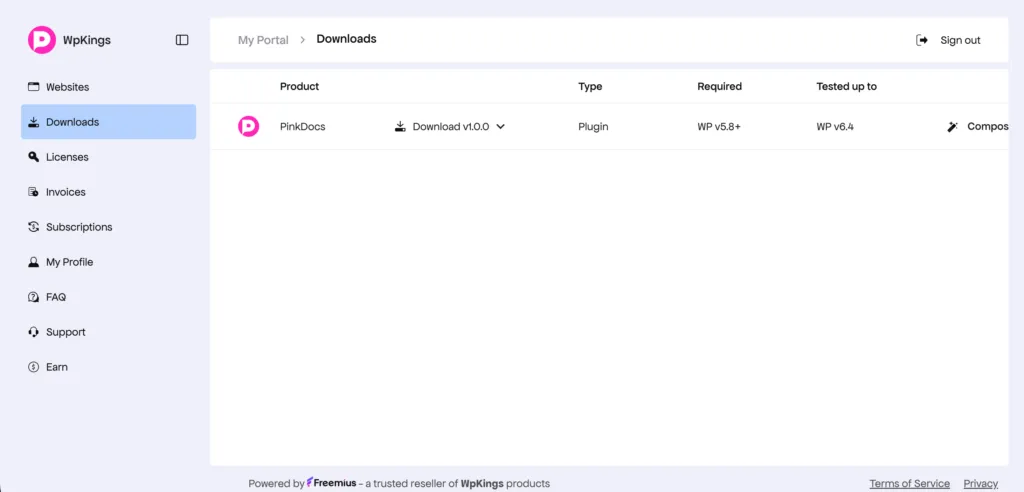
1. Download the Plugin File
Navigate to the downloads section of your PinkDocs account to download the plugin file.
2. Install the Plugin
- Log in to your WordPress admin panel.
- Go to Plugins > Add New.
- Click on the Upload Plugin button.
- Select the downloaded PinkDocs plugin file (.zip) from your computer.
- Click Install Now.
3. Activate the Plugin
- After installation, click on Activate Plugin.
Configuration Steps
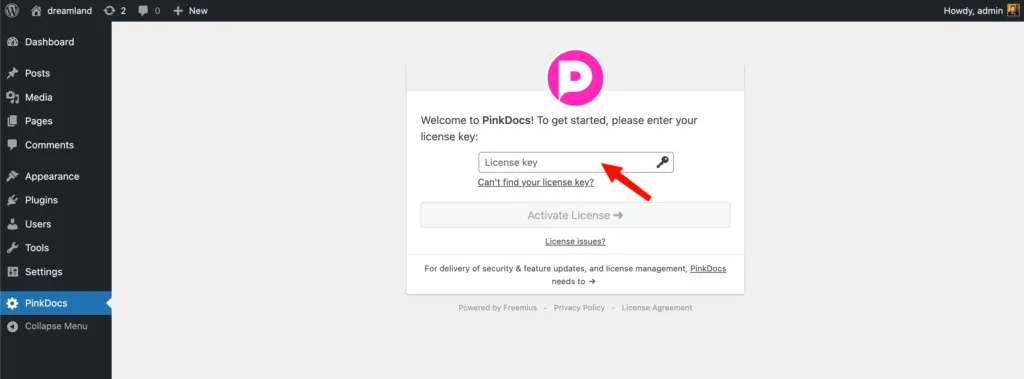
1. Paste Your License Key
After activating the plugin, you need to enter your license key to unlock its features:
- Navigate to PinkDocs in your WordPress dashboard.
- Locate the License Key input field.
- Paste your license key, which you can find in your email or on the Licenses page.
- Click Activate.
Verification Steps
To confirm that PinkDocs has been installed and activated successfully:
- Check for the PinkDocs menu in your WordPress dashboard.
- Verify that there are no error messages related to licensing.
- Ensure that you can access the features of PinkDocs.
Common Installation Issues and Troubleshooting
1. License Key Not Valid
If you receive a message stating that your license key is not valid, double-check the following:
- Ensure that you have copied the license key correctly without any extra spaces.
- Confirm that your account is active and that the license key has not expired.
2. Plugin Does Not Appear in Dashboard
If PinkDocs does not appear in the WordPress dashboard:
- Ensure that the installation was successful and that you see the Activate Plugin button after installation.
- Check for any conflicts with other plugins by deactivating them temporarily.
3. Error During Plugin Installation
If you encounter an error during the installation process:
- Check your PHP version to ensure it meets the minimum requirement.
- Make sure you have sufficient permissions to install plugins on your WordPress site.
If issues persist, consult the PinkDocs support team or refer to the documentation on the PinkDocs website for further assistance.
Conclusion
By following this guide, you should be able to install and activate PinkDocs successfully. For any further questions or technical support, please reach out to the PinkDocs support team.