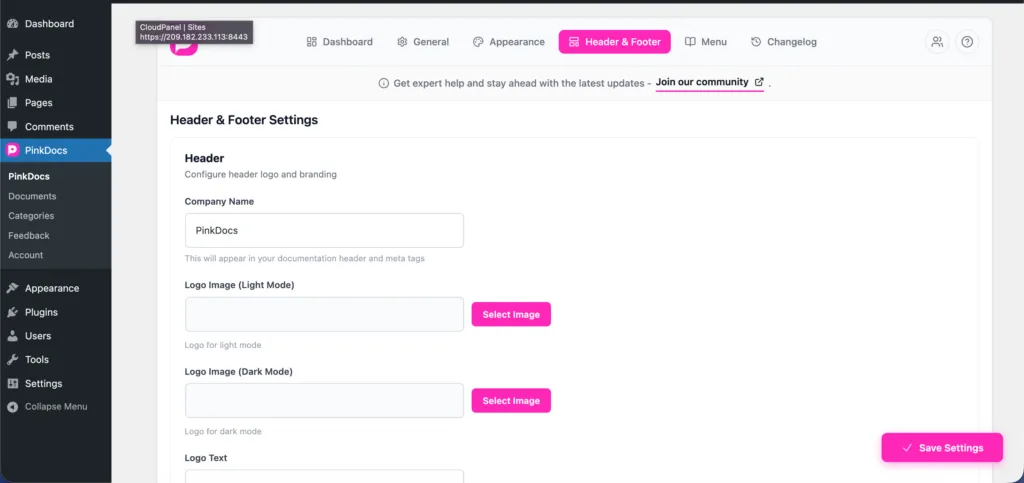


Location: Plugin Settings → Header & Footer → Footer
The Powered by PinkDocs option lets you display a credit link in your documentation footer. You can also earn commissions by linking it to your affiliate account.
How to Enable
- Go to Plugin Settings → Header & Footer
- Scroll to the Footer section
- Enable Powered by PinkDocs
- Click Save Settings
Add Your Affiliate Link (Optional)
- If you are an approved affiliate, paste your referral URL into the Affiliate Link field
- The “Powered by PinkDocs” footer link will use your affiliate URL instead of the default link
Apply for the Affiliate Program
To earn commissions from referrals, apply here:
👉 https://pinkdocs.com/affiliate
How It Works
- The credit appears at the bottom of all documentation pages
- Visitors clicking the link are tracked via your affiliate URL
- If no affiliate link is added, the default PinkDocs link is used
- You can disable the credit at any time
This is an easy way to support PinkDocs while earning from referrals with zero setup complexity.
Was this page helpful?
Great! What worked best for you?
Please
provide
additional details about your experience.
✓ Thank you for your feedback! We appreciate your input.