

This feature adds a global settings search to PinkDocs, making it fast and effortless to find any option across the plugin.
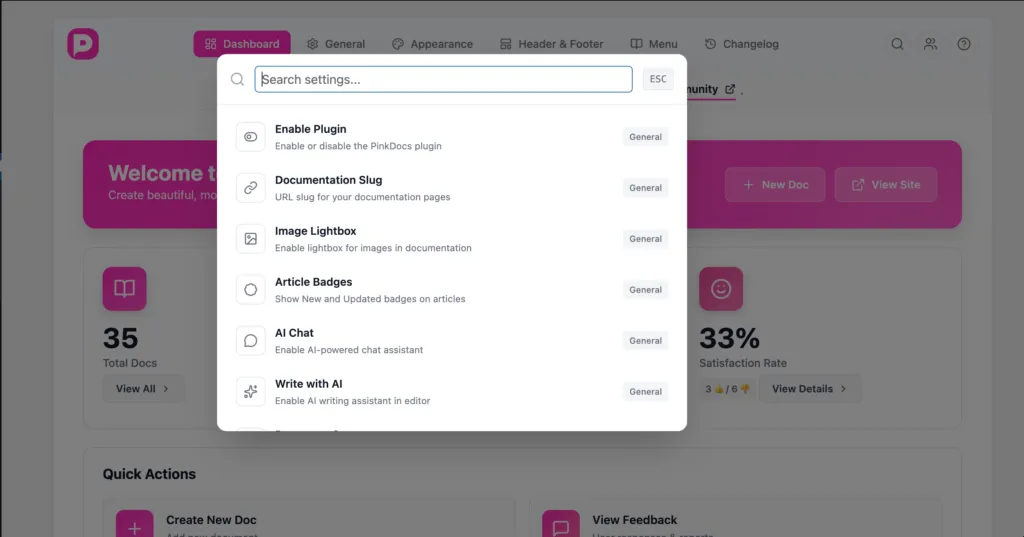
How it works:
- Click the search icon in the settings header.
- Start typing a keyword (for example: logo, AI, slug).
- Matching settings are instantly listed with their section labels.
- Selecting a result automatically scrolls the page to that exact setting.
- The target setting is visually highlighted, so users can immediately spot and update it.
Benefits:
- Eliminates manual scrolling through long settings pages.
- Helps new users quickly locate unfamiliar options.
- Improves overall usability and speed, especially as the number of settings grows.
This makes PinkDocs settings feel more like a modern app than a traditional WordPress options page.
Was this page helpful?
Great! What worked best for you?
Please
provide
additional details about your experience.
✓ Thank you for your feedback! We appreciate your input.