

Location: PinkDocs → Plugin Settings → General → SEO Settings
PinkDocs lets you control how your documentation appears in search engines and when shared on social media.
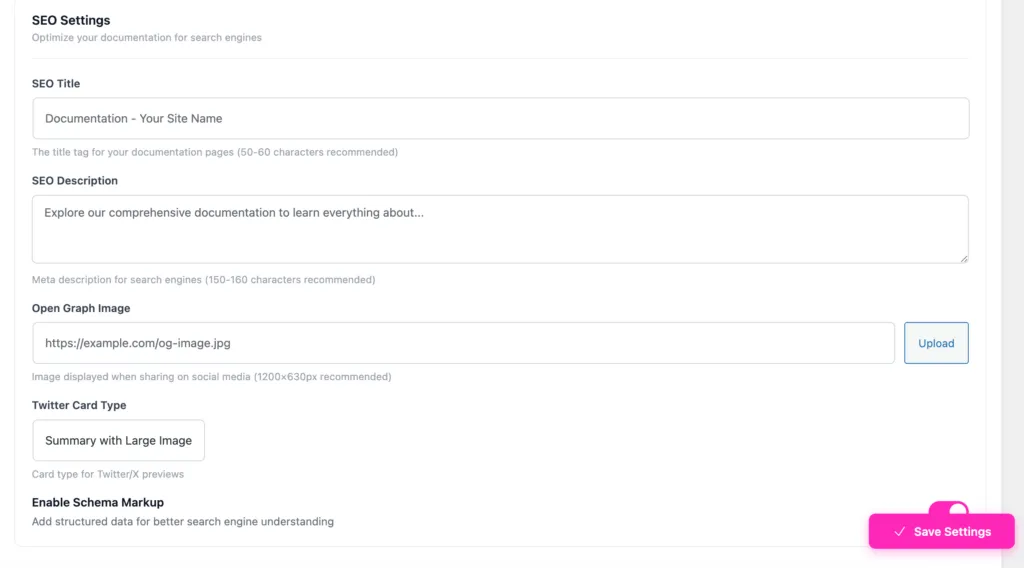
SEO Title
- Sets the
<title>tag for documentation pages - Recommended length: 50–60 characters
- Example:
Documentation – PinkDocs
This is what appears as the main title in Google search results.
SEO Description
- Sets the meta description for search engines
- Recommended length: 150–160 characters
- Example:
Explore detailed documentation, guides, and tutorials to get the most out of PinkDocs.
This helps improve click-through rates from search results.
Open Graph Image
- Image used when your documentation is shared on:
- Slack
- Recommended size:
1200 × 630 px - You can paste an image URL or upload one directly
Twitter Card Type
- Controls how your documentation looks on X (Twitter)
- Default: Summary with Large Image
- Displays a large preview image with title and description
Enable Schema Markup
- Adds structured data to your documentation pages
- Helps search engines better understand your content
- Improves eligibility for rich search results
How It Works
- These settings apply globally to all PinkDocs pages
- Automatically injected into page metadata
- No SEO plugin required
- Compatible with existing SEO setups
SEO Settings in PinkDocs ensure your documentation is search-friendly, share-ready, and optimized without extra plugins or manual code.
Was this page helpful?
Great! What worked best for you?
Please
provide
additional details about your experience.
✓ Thank you for your feedback! We appreciate your input.