

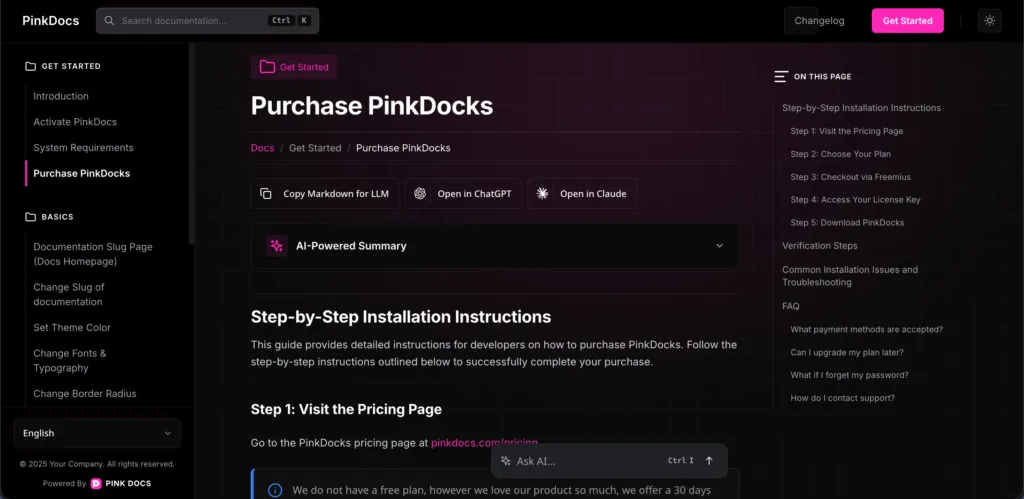
PinkDocs includes a smart, scrolling Table of Contents that automatically tracks your document structure and highlights sections as users scroll.
How It Works
- The “On This Page” panel is generated automatically
- It reads your document headings in real time
- As users scroll, the active section is highlighted instantly
- Clicking any item smoothly scrolls to that section
No setup. No shortcodes. Just write.
Heading Levels Used
The TOC is built using standard Gutenberg headings:
- H1 – Page title (used as the main document heading)
- H2 – Primary sections (shown prominently in the TOC)
- H3 – Subsections (nested under H2)
- H4+ – Optional deeper structure (supported automatically)
Simply use Gutenberg’s Heading block and select the appropriate level.
Best Practices for Clean TOC
- Use one H1 per document
- Structure content with H2 for major sections
- Use H3 for steps, FAQs, or sub-topics
- Avoid skipping heading levels (H2 → H4)
Why Users Love It
- Faster navigation in long docs
- Always know where they are on the page
- Perfect for installation guides, changelogs, and tutorials
- Improves readability and SEO structure
The scrolling TOC turns long documentation into a guided, effortless reading experience—automatically powered by how you already write.
Was this page helpful?
Great! What worked best for you?
Please
provide
additional details about your experience.
✓ Thank you for your feedback! We appreciate your input.