

PinkDocs lets you control the order of your documentation using a simple drag and drop menu system.
Location: PinkDocs → Menu
Reordering Documents & Categories
Step 1: Open the Menu Manager
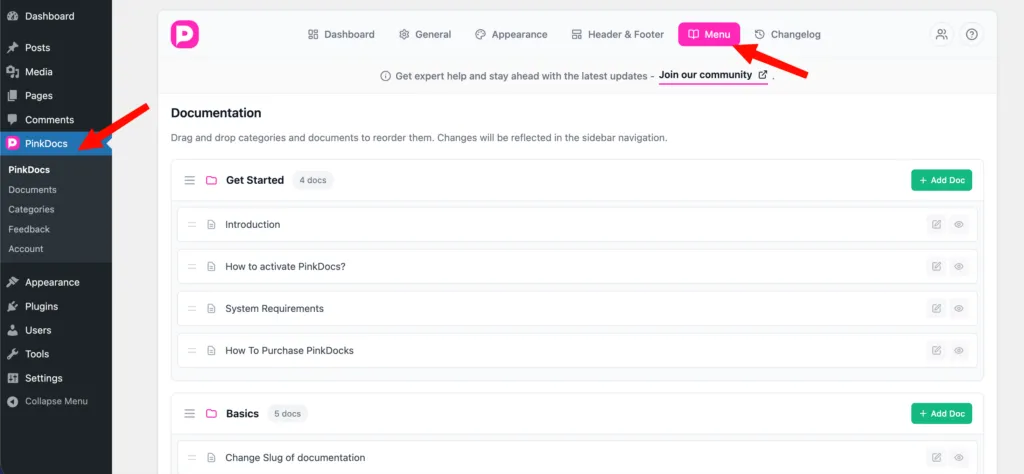
- Go to WordPress Dashboard
- Navigate to PinkDocs → Menu
You’ll see all your categories and documents listed in a structured layout.
Step 2: Drag and Drop Items
- Drag categories to change their order
- Drag documents inside a category to reorder them
- Nest documents under the correct category if needed
The interface updates visually as you move items.
Step 3: Save Order
- Click Save Order after arranging items
- Changes apply instantly
Where This Order Is Used
The order you set here is reflected across PinkDocs:
- Sidebar navigation
- PinkDocs category blocks
You only need to set the order once.
Important Notes
- No WordPress menu setup required
- Ordering is independent of publish date
- Drag-and-drop works for both categories and documents
- Ideal for onboarding flows and step-by-step docs
Best Practices
- Place Get Started or Introduction at the top
- Group related documents under clear categories
- Keep advanced topics lower in the list
This gives you full control over how users discover and navigate your documentation in PinkDocs.
Was this page helpful?
Great! What worked best for you?
Please
provide
additional details about your experience.
✓ Thank you for your feedback! We appreciate your input.