

Finding the right answer shouldn’t feel like work. PinkDocs Live Search delivers a blazing-fast, command-palette style search that helps users reach the right documentation in seconds.
Search Without Breaking Flow
Open search from anywhere:
- Click the search bar in the header
- Press Ctrl + K (⌘ + K on Mac)
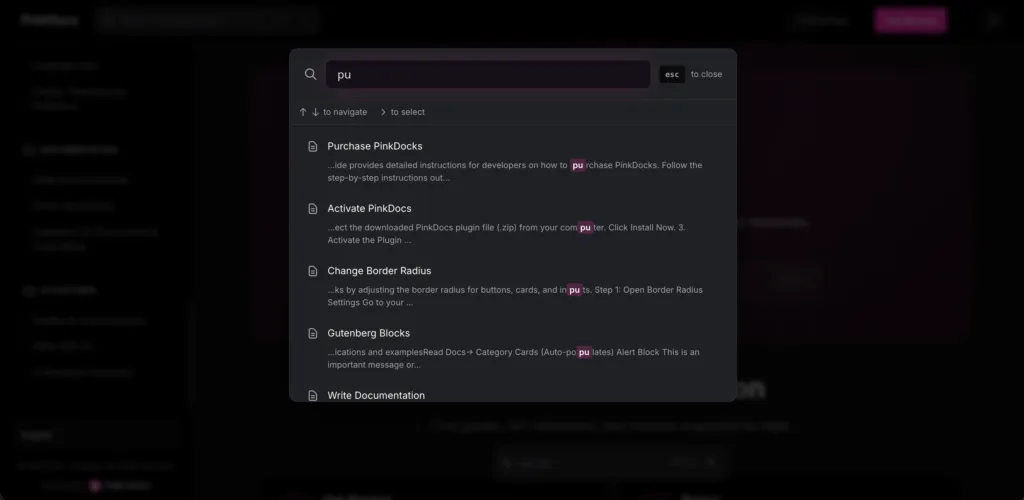
A clean, focused overlay appears instantly—no page reloads, no distractions.
Results as You Type
Live Search updates in real time:
- Searches across titles, content, and categories
- Highlights matched keywords
- Shows contextual previews so users know they’re clicking the right result
It feels responsive, modern, and effortless.
Built for Power Users
- Navigate results with ↑ / ↓
- Press Enter to open
- Hit Esc to close
Perfect for developers and fast-moving teams who prefer keyboard-first workflows.
Works Everywhere
- Header search bar
- Hero sections with search
- Available globally across your documentation
Users are never more than one shortcut away from an answer.
Live Search – Search Terms Tracking
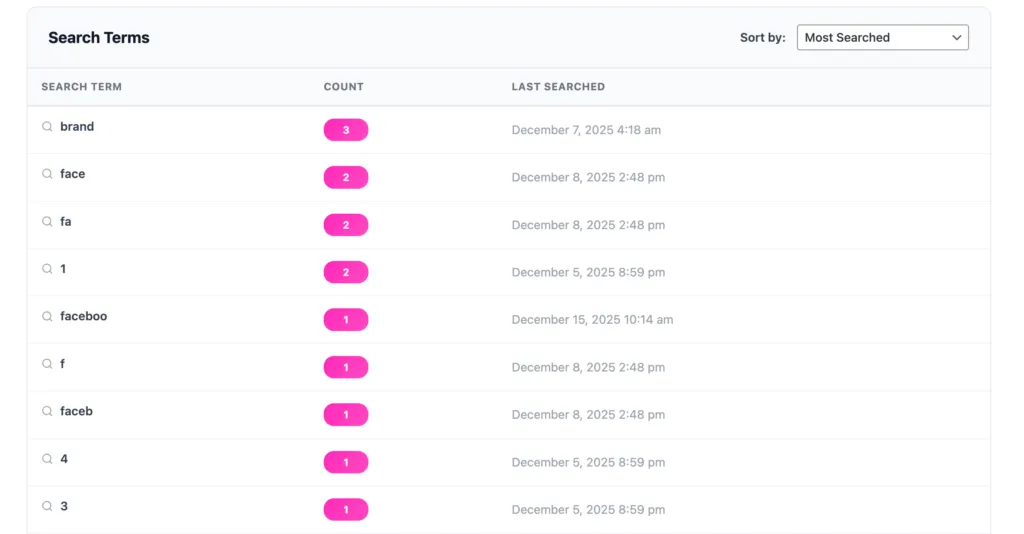
The Live Search feature not only helps visitors find documentation instantly, but also records every search query for analysis. All searched keywords are automatically stored in your dashboard, allowing you to understand user intent and improve your documentation based on real usage data.
How Search Term Tracking Works
- User searches in Live Search
Whenever a visitor types a query in the live search bar, the term is captured in real time. - Automatic logging
Each search term is automatically saved in the dashboard without any manual setup. - Search count tracking
Repeated searches for the same term are grouped together and counted, helping you identify popular or missing topics. - Last searched timestamp
The dashboard records when a term was last searched, giving you insight into current user interests. - Sortable insights
Search terms can be sorted by most searched or recently searched, making it easy to prioritize documentation updates.
Why This Is Useful
- Identify gaps in your documentation
- Discover what users expect to find but may not exist yet
- Improve content structure and naming
- Make data-driven decisions for new docs and FAQs
All insights are available directly inside the dashboard, giving you complete visibility into how users interact with your documentation search.
Why Users Love It
- Zero friction discovery
- Faster problem solving
- No digging through menus
- Scales beautifully as your docs grow
Why Teams Choose It
- Reduces support tickets
- Improves documentation adoption
- Creates a premium, polished experience
PinkDocs Live Search turns your documentation into an instant, intelligent discovery layer—so answers are always just a keystroke away.